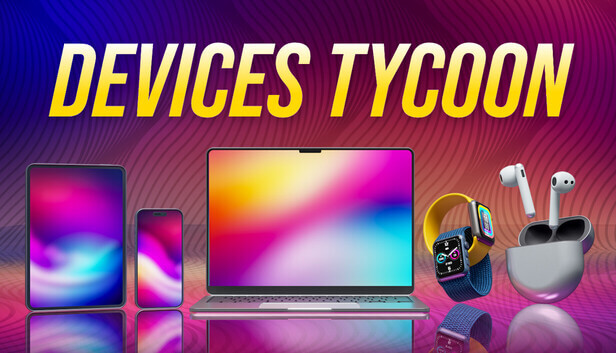
Devices Tycoon for PC: Gameplay, Controls and Where to Play
- Developer
- Roastery Games
- Platforms
- PC (Windows, via Steam)
- Release status
- Released
- Category
- Strategy
All devices, one game: the evergreen fact sheet for the Devices Tycoon PC release on Steam.
Devices Tycoon for PC is a business simulation game by Roastery Games, released on Steam on October 17, 2026, in which you build a tech company and design, produce and sell your own devices: smartphones, tablets, laptops, smart watches, headphones, TVs, operating systems and even processors. It is a single-player Windows game sold on Steam, not a browser game, so it does not run on this page. This is an information page: every fact below comes from the game’s official Steam store page and Roastery Games’ official site, and the links at the end take you to the official places to get it.
Gameplay
The goal of Devices Tycoon is simple to state and slow to master: start with nothing but a company name, and grow it into a global device maker. You begin by choosing your company’s name, the country it is founded in and your starting capital, and from that point every decision is yours.
The heart of the game is the device editor. Across the run of a company you create smartphones, tablets, laptops, smart watches, headphones, TVs, operating systems and processors. For each product you pick the device size, color, screen, processor, graphics card, speakers and packaging, and Roastery Games counts more than 10,000 different functions you can edit, so two players rarely ship the same phone. When your first devices reach store shelves, customers review them, and the higher your review score, the better your sales perform.
Around the workshop sits a full management layer:
- Hiring. You recruit designers, programmers and engineers from around the world to work for your company.
- Offices. You can buy and upgrade more than 16 offices for your designers, programmers and engineers as the team grows.
- Launch work. Before a device goes on sale you can hold a presentation for it, and you can study marketing to support your releases.
- Competition. You can view ratings of other companies around the world and measure yourself against them.
- Expansion. Later on, you can open your own stores around the world, negotiate with rivals, and even buy other companies.
The Steam listing marks the game as Single-player, with Steam Achievements, Steam Cloud and Family Sharing support. There is no multiplayer mode listed. If you have played other device-design tycoons, the loop here is the classic one — design, launch, read the reviews, and reinvest the profits — but stretched across every category of modern gadget rather than one product line.
Controls
Devices Tycoon is played with a mouse and keyboard. Nothing in the game demands quick reflexes: you move through menus and forms, click through the device editor’s options, and manage your staff and offices from management screens, so point-and-click input covers everything the game asks of you.
One detail worth checking before you buy: the Steam store page lists no controller support for the game. Its store features are Single-player, Steam Achievements, Steam Cloud, Family Sharing and Accessibility Features — no gamepad category appears anywhere on the listing. If you were hoping to play Devices Tycoon from the couch with a controller, the store page currently gives no support for that idea; plan on the traditional mouse-and-keyboard setup.
The Devices Tycoon PC requirements are modest by modern standards. The minimum specification asks for Windows 7 Home 32-bit, a 2.0 GHz single-core processor, 2 GB of RAM, hardware-accelerated graphics and 1 GB of storage, so almost any Windows laptop or desktop from the last decade can run it.
Tips for your first company
None of these tips require hidden knowledge — they follow directly from the systems Roastery Games describes on the store page:
- Master one device type first. The editor spans phones, tablets, laptops, watches, headphones, TVs, operating systems and processors. Getting one line profitable before spreading into every category keeps your starting capital working instead of scattered.
- Treat reviews as your roadmap. Customer reviews appear as soon as your devices hit shelves, and higher scores mean better sales. If a device sells poorly, its review score tells you where to aim the next redesign.
- Hire toward your bottleneck. Designers, programmers and engineers each do different work. Adding the specialist your current device actually needs beats hiring evenly across all three roles.
- Upgrade offices as the team grows. With more than 16 offices available to buy and upgrade, space is a real constraint; expanding it keeps your growing staff productive.
- Use presentations and marketing before launch. These tools exist to support your sales, so a launch that skips them leaves review score and revenue on the table.
- Watch the global company ratings. The game lets you view ratings of other companies around the world; use them to gauge when your brand can support moves like opening your own stores or negotiating acquisitions.
Who makes Devices Tycoon?
Devices Tycoon is developed and published by Roastery Games, which lists the game alongside its sibling tycoon titles Console Tycoon and Laptop Tycoon on its official site. The studio also publishes a mobile edition of Devices Tycoon: its site links to the game on Google Play and on the App Store, so the franchise exists beyond the PC version described here.
Where to play
Devices Tycoon is a paid, one-time purchase on Steam for Windows PCs — it released on October 17, 2026, and the store page is the authoritative place to check its current price and any discount, since both change over time. You can also find it through Roastery Games’ official page for the game, which links out to every official version.
- Official page: Roastery Games — Devices Tycoon
- PC (Steam): Devices Tycoon on Steam
- Mobile: the official page links to Devices Tycoon on Google Play and the App Store
Two honest notes for shoppers. First, Roastery Games’ own site still displays a “coming soon on Steam” banner that predates the launch — the Steam store page, with its live purchase box and October 17, 2026 release date, is the current state of things. Second, there is no browser version of Devices Tycoon: you cannot play it on GameClick or any other games portal, and any site claiming to run the full PC game in a tab is not an official source.
FAQ
Is Devices Tycoon free to play? No. On PC it is a paid, one-time purchase on Steam; the store page shows the current price and any running discount.
When did Devices Tycoon come out on PC? The Steam release date is October 17, 2026. The game had been listed before launch, and Roastery Games’ site still carries an older “coming soon” banner, but the store page confirms the game is out.
Who developed Devices Tycoon? Roastery Games developed and published it. The same studio’s site lists Console Tycoon and Laptop Tycoon as sibling titles.
Can you play Devices Tycoon in a browser? No. It is a Windows game sold on Steam, and no browser version exists on official channels. GameClick hosts playable browser tycoon games of its own — see the links below.
Does Devices Tycoon have controller support? The Steam listing includes no controller-support category, only Single-player, Steam Achievements, Steam Cloud, Family Sharing and Accessibility Features. Play it with a mouse and keyboard.
Is Devices Tycoon available on phones? Yes. Roastery Games’ official page links to Devices Tycoon on Google Play and the App Store, alongside this PC release. This page covers the Steam version.
Is Devices Tycoon multiplayer? No multiplayer mode is listed. The Steam features are Single-player, Steam Achievements, Steam Cloud and Family Sharing.
More tycoon games on GameClick
If you want the tycoon loop without installing anything, GameClick has free browser games you can start instantly:
- Idle Startup Tycoon — grow a startup from a small team of a programmer, engineer and salesperson into a money-making empire.
- Army Commander Tycoon — build and upgrade a military base, recruit infantry, tanks and artillery, and capture strategic points.
Both run in the browser with no download and no account, which makes them a natural quick fix while the full Devices Tycoon PC download is not within reach.