Army Commander Tycoon
- Developer
- sad builderboy
- Platforms
- PC (Roblox app), Mac (Roblox app), Mobile (Roblox app), Xbox console (Roblox app)
- Release status
- Released
- Category
- Strategy
Build the base, grow the army, take the map — the facts-first guide to the Roblox tycoon by sad builderboy.
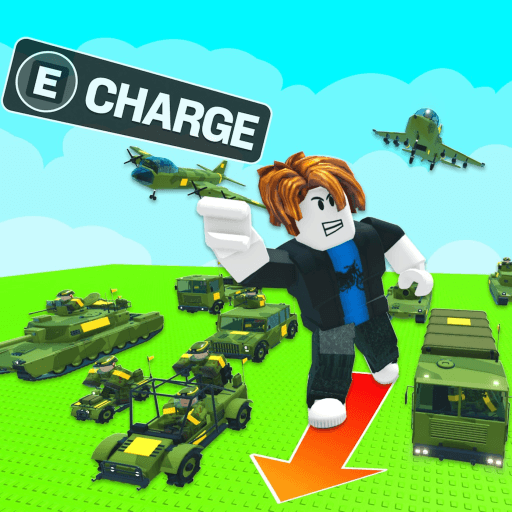
Army Commander Tycoon is a free tycoon game on Roblox by the creator group sad builderboy. You start with a small military outpost and grow it into a war machine: build and upgrade your base, recruit troop types, unlock tanks, artillery and helicopters, then send your army out to capture strategic points across the map. Servers hold up to 8 players, and the whole loop points at one goal — become the strongest commander. This guide explains how the gameplay loop fits together, which controls you use on PC, mobile and console, what is worth your time in the early game, and where to play it officially.
Gameplay
Roblox lists the game under Simulation and Tycoon, and the official description sums up the pitch in one line: “Build your base. Command your army. Conquer the battlefield.”
Everything in the game hangs off three connected systems:
- Base building. Your military base is the foundation. You construct and upgrade it over time, and each upgrade moves you from a small outpost toward the “powerful war machine” the game describes.
- Recruiting and unlocking units. You recruit troop types and unlock more hardware as you progress: infantry first, then tanks, artillery, helicopters and other vehicles and aircraft. A bigger, more varied army is what lets you take on bigger objectives.
- Capturing strategic points. The stated objective is to send your army out to capture the strategic points across the map and crush enemy forces. Held territory is where your pushes pay off.
The economy is the glue holding the loop together. The official description promises that you “earn more income as your army expands”, so growth compounds: a bigger army earns more, that income pays for base upgrades and more recruits, and the new recruits let you push further across the map. Ignoring one side of that trade — army without base, or base without army — is the classic way to stall in a tycoon like this.
Multiplayer is capped at up to 8 players per server, so each map stays a small, self-contained campaign rather than a huge lobby. One honest note: the official description says you fight “enemy forces” but does not state whether those enemies are AI defenders or other players’ armies — expect opposition either way and judge a server by what you find in it.
The end state the game aims you at is explicit too: “Upgrade, conquer and become the strongest commander,” it says, closing with the question “Can you build the ultimate army?”
Controls
Army Commander Tycoon publishes no custom control scheme — its official description lists no special keybinds — so it plays with Roblox’s standard controls. The exact in-game reference is built into every Roblox experience: open the Roblox menu and use the Help tab, which contains the keyboard shortcuts, mouse instructions and mobile gestures for your device.
What that means per platform:
- PC and Mac. You play through the Roblox app — the green Play button on the game’s page launches it. In the camera’s Classic mode, you hold the right mouse button and drag to look around. Press Shift to toggle Shift Lock, which keeps the camera locked over your avatar’s shoulder, and use the backslash key (
\) if you want to navigate menus with the keyboard instead of the mouse. - Mobile. Roblox’s official apps run on iOS 14 and iPadOS 14 or higher, Android 8.0 or higher, and recent Fire tablets. Movement and camera use the standard on-screen touch controls, and the same in-experience Help menu documents the touch gestures for your device.
- Xbox and other consoles. Roblox on Xbox uses the same general controls as every Roblox experience on console. The full controller map is always available in-experience: open the Roblox Menu, go to Settings (press up on the left stick) and press RB to reach the Help tab.
The Roblox menu itself is worth knowing on any platform: it gives you quick access to chat, the leaderboard, capture and respawn (reset character). You do not need to memorize anything to get started — the controls you actually use are the standard Roblox ones, and the game’s own Help tab is always one menu away.
Tips and strategy
These tips only restate and combine what the official description confirms, so treat them as guidance on priorities rather than hidden mechanics:
- Grow income early. The game tells you directly that you earn more income as your army expands. Early recruiting is not a side activity — it is the economy that funds everything else.
- Keep the base upgrading. The description pairs building with upgrading, and the stated progression runs from small outpost to powerful war machine. Keep both halves of the loop moving instead of perfecting one.
- Unlock unit variety. Infantry, tanks, artillery and helicopters are listed as separate unlocks, and each new unit type adds another tool for taking objectives. If a push stalls, widening the roster usually beats grinding the same fight.
- Push objectives once you have an army worth sending. Capturing strategic points is the stated path to conquest. Losing a point fight is a signal to grow income and unlock units, not to retry the same engagement immediately.
- Check the Help menu on a new device. Standard Roblox controls shift slightly between PC, mobile and console; the built-in Help tab shows the exact bindings for whatever you are playing on.
- Mind the server size. Servers hold up to 8 players. If you want a quieter start, pick a server with fewer players in it.
Where to play
Army Commander Tycoon runs inside Roblox, so the only official place to play it is the game’s own page on Roblox: Army Commander Tycoon on Roblox.
- Playing is free; you need a Roblox account, which is free to create.
- On a computer, press the green Play button on that page and Roblox launches the experience in the Roblox app. On phones and tablets, the Roblox app opens it directly; on Xbox, you find it through the Roblox app on the console.
- This GameClick page is an information guide only. The game does not run in your browser here — use the official link above.
Stick to that official page when you look for the game. Search results often mix in other army and commander games with similar names, and the Roblox page above is the one maintained by sad builderboy.
FAQs Army Commander Tycoon
What is Army Commander Tycoon?
A free tycoon experience on Roblox by the group sad builderboy. You build and upgrade a military base, recruit troop types, unlock infantry, tanks, artillery and helicopters, and send your army to capture strategic points across the map, on servers of up to 8 players.
Is it free to play?
Yes. Joining the experience costs nothing and there is no purchase price on the game itself; you only need a Roblox account. The Roblox app is free to install on PC, Mac, mobile and Xbox.
Who made the game?
The Roblox group sad builderboy — the creator shown on the game’s official page and in Roblox’s public game data.
Can I play Army Commander Tycoon on mobile or console?
Yes, through Roblox itself. Roblox publishes official apps for iOS, iPadOS, Android and Fire tablets, and runs on Xbox consoles, so the experience is reachable on PC, Mac, mobile and console with the same account.
What are the controls in Army Commander Tycoon?
There is no custom control scheme to learn: the official description lists none, and the game runs on Roblox’s standard controls. On PC you rotate the camera by holding the right mouse button and dragging, toggle Shift Lock with Shift, and find the full key list for your device in the in-experience Help tab of the Roblox menu.
How do I capture points?
Grow an army first — recruit troop types and unlock infantry, tanks, artillery and helicopters as you progress — then send your forces out to capture the strategic points marked across the map. The official loop feeds itself: a bigger army earns more income, and that income pays for the next push.
Can I play Army Commander Tycoon on GameClick?
No. This page is an information guide. Army Commander Tycoon runs inside Roblox, so use the official Roblox link in the Where to play section above. GameClick’s own library is free browser games you can start instantly, including the strategy picks below.
Similar games on GameClick
If you want something playable right now in the browser, these free strategy games on GameClick are one click away:
- State.io: a fast-paced strategy game where you conquer territories and outsmart opponents in a race for world domination.
- Army of Soldiers: Worlds War: lead your army in battle and protect ALPHA DESTRUCTOR 1 from invading creatures.
- TABS: build armies, manage budgets and set up strategic skirmishes, with a Sandbox mode for creativity.
- Planet Clicker 2: explore space, build your energy empire and conquer the solar system with upgrades.