Simulator GT Motorsport – Gameplay & Where to Play
- Developer
- breyman games
- Platforms
- Desktop browser, Mobile browser
- Release status
- Released
- Category
- Racing
The browser GT racing sim by breyman games: four event types, upgrades, a skill tree, and the controls, verified from the official listing and recorded play.
About Simulator GT Motorsport – Gameplay & Where to Play
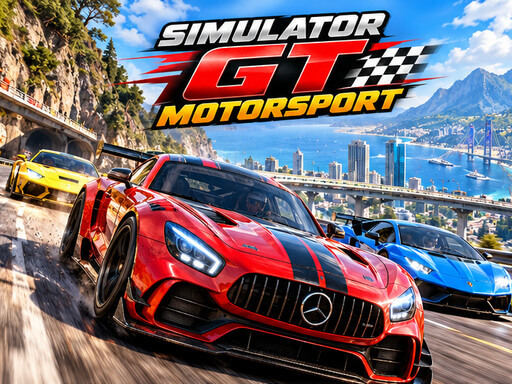
Simulator GT Motorsport is a free GT-style racing game by the developer breyman games (in-game branding: BreymanTech) that runs in a desktop or mobile browser — no download, no installer, no account. You pick a car, tune it with upgrades, grow a skill tree, and then take on four event types: Circuit, Short Race, Drag Race, and Drift. GameMonetize, the platform that distributes it, published the game on October 23, 2026 and lists it under Racing and Sports with drift, driving, racing, simulation, simulator, and traffic tags.
It is a browser simulation in the GT Motorsport mold: closed circuits, rival grids, and a garage loop that rewards every finish. You start with one car — the Street 86 — a 6,000-coin balance, level 1, and 1 SP. From there, every race pays coins, every coin moves your build forward, and the garage screen tracks your car’s SPEED, ACCEL, BRAKES, and HANDLING stats so you can see exactly what an upgrade buys.
This page is a fact sheet: the verified gameplay, the full control mappings for keyboard, mouse, and touch, and the official link to launch the game. GameClick does not host the playable frame for this title yet — the Where to play section below sends you to the game’s official listing, where it runs free in the browser.
Gameplay
The garage is the hub. From it you reach CARS, UPGRADE, SKILLS, DAILY, and RACE. Your current car — the Street 86 when you start — is shown with its four stats, and the menu shows a Winnings banner (+1,000). Coins, LV, and SP sit in the top bar so you always know what a purchase or a race is worth.
The four event types
RACE opens the Select Event screen with four modes:
- Circuit — proper multi-lap races against 5 rivals. This is the core GT experience: grid start, full field, and a track you learn over the laps.
- Short Race — a single lap where you start last against 7 rivals. It is a pure overtaking sprint: the field is ahead of you, and the lap is all you get.
- Drag Race — a 1v1 decided by perfect shifts. Launch clean, hit your shift windows, and cross the line first.
- Drift — a 90-second score attack. Link slides, hold angles, and beat your own score rather than a grid of rivals.
Event options
Every event can be tuned before you start: switch the track between Forward and Reverse, set 1, 2, or 3 laps, and choose rival difficulty between Easy, Normal, and Hard. The screen also shows your current car and offers a Full Nitro bonus next to the Start button.
Progression
Racing pays coins, and coins feed three systems: buying cars in the CARS section, upgrading stats in UPGRADE, and unlocking perks in the skill tree. A Daily Reward ladder adds a reason to come back: day one pays 500 coins and the ladder climbs to 6,000 coins plus 1 SP on day seven, with a bonus claim option if you want to double a day’s payout. Your level (LV) and SP sit alongside the coin balance in the HUD.
In a recorded Circuit race, the race HUD tracks position (you start 6th of 6 in a two-lap default), lap, and a running time, with a speedometer and nitro gauge alongside. Holding the gas key took the Street 86 from 0 to 71 km/h and up through the gears on the start straight, and the steering keys turned the car accurately enough to reach the pit wall — which is one way to learn that walls slow you down.
Controls
Simulator GT Motorsport opens with a Choose controls dialog: Keyboard + Mouse or Mouse Only. You can change your choice anytime in Settings, so it is worth trying both.
Keyboard and mouse
The in-race help panel lists the full mapping:
- W — gas
- S — brake / reverse
- A / D — steer
- Space — handbrake
- Shift — nitro
- C — camera
- B — look back
- R — reset car
- Esc — pause
- H — hide the help panel
That is the official GameMonetize instruction — “WASD to move” — expanded by the game’s own HUD.
Mouse-only and touch
Mouse mode replaces the pedals with hold-to-drive inputs: move the mouse to steer, hold L for gas, and hold R for brake or reverse, with separate nitro and handbrake buttons. On mobile, GameMonetize marks the game Mobile Ready, and the race screen shows on-screen handbrake and nitro buttons plus a steering slider at the bottom of the frame, so the same events are playable on a phone or tablet. The game runs in a 900×600 landscape frame — rotate a phone to landscape for the full view.
Tips & strategy
These follow directly from the rules above — no secret builds, just the pieces the game itself hands you:
- Drift mode lives on the handbrake. The 90-second score attack rewards linked slides, and Space (or the handbrake button) is how you break traction on demand. Feather the gas mid-slide to hold the angle.
- Drag Race is decided at the shift points. The mode is explicitly “perfect shifts”: treat your first race as a calibration run to learn the rhythm, then chase a clean launch every time.
- Start Short Race races in the pack, not on the poster. You begin last against 7 rivals with one lap to work. Pick a line through the first two corners and pass where the track is widest, because there is no second lap to fix a mistake.
- Use the difficulty ladder. RIVALS has Easy, Normal, and Hard. Farming Easy Circuit races is a legitimate way to fund early upgrades; move up when the wins get boring, not before your handling stat can carry you.
- Reverse tracks are free practice. Switching TRACK to Reverse reuses the same circuit with new braking references — ideal between attempts, because the rivals’ difficulty does not change with the direction.
- Claim the daily ladder before you buy. The Day 7 payout alone is 6,000 coins plus 1 SP — a full starting balance — so time purchases around the claim rather than draining coins the day before a big payout.
- Upgrade what the event punishes. Drag Race cares about acceleration, Circuit about handling and brakes, Drift about controllability. The garage shows SPEED, ACCEL, BRAKES, and HANDLING separately, so match the stat to the next event on your list.
Where to play
Simulator GT Motorsport is played in the browser on its official GameMonetize listing page: gamemonetize.com/simulator-gt-motorsport-game. Open that page and the game launches on the spot — free, in a 900×600 landscape frame, with a short interstitial ad (and a Skip control) before it loads, which is standard for games distributed on the platform. It runs on desktop browsers and on mobile browsers, where the game’s Mobile Ready touch controls take over.
GameClick does not host the playable frame for this title yet, so this page stays a verified fact sheet rather than a pretend play button. GameMonetize licenses its catalog for embedding on partner sites, and if a licensed embed for this game becomes available to GameClick, this same URL will turn into the playable page — one game, one URL, upgraded in place.
FAQ
What is Simulator GT Motorsport?
A free browser racing game in the GT style: you drive GT Motorsport-style cars, upgrade them, build a skill tree, and compete in Circuit, Short Race, Drag Race, and Drift events against rival cars.
Is Simulator GT Motorsport free to play?
Yes. Every mode, the garage, upgrades, and the daily rewards are free. The game is supported by a short ad before it loads.
Can I play Simulator GT Motorsport on mobile?
Yes. GameMonetize marks it Mobile Ready, and the race screen provides touch inputs — on-screen nitro and handbrake buttons with a steering slider. Play in landscape: the game frame is 900×600.
What are the controls?
On keyboard: W for gas, S for brake or reverse, A and D to steer, Space for the handbrake, Shift for nitro, C for camera, B to look back, R to reset the car, and Esc to pause. In mouse or touch mode you steer by moving the pointer or the on-screen slider and hold the on-screen pedals for gas and brake.
Which game modes are included?
Four: Circuit (laps against 5 rivals), Short Race (1 lap, starting last of 8), Drag Race (1v1 with perfect shifts), and Drift (a 90-second score attack). You can set track direction, lap count, and rival difficulty for each.
How do upgrades and the skill tree work?
Races pay coins. Coins buy stat upgrades — SPEED, ACCEL, BRAKES, HANDLING — new cars, and skill-tree perks. The daily ladder pays up to 6,000 coins plus 1 SP on day seven, and SP feeds progression alongside your level.
Who made Simulator GT Motorsport?
The developer listed on GameMonetize is breyman games; the in-game branding is BreymanTech. The game is distributed through the GameMonetize platform and has been listed there since October 23, 2026.
Similar games on GameClick
If you like this one, these racing and driving games on GameClick are playable in the browser right here:
- Traffic Speed Racer — a GameClick driving game, playable on the page.
- Speed Racer Online Game — a GameClick racing game, playable on the page.
- Smash Karts — a GameClick driving game, playable on the page.
- Slow Roads io — a GameClick driving game, playable on the page.