First Person Boxing
- Developer
- Can You Box?
- Platforms
- PC, Mobile, Console
- Release status
- Released
- Category
- Sports
A true first-person boxing game on Roblox: slip punches, hold your guard, land counters, and manage stamina all the way to the knockout.
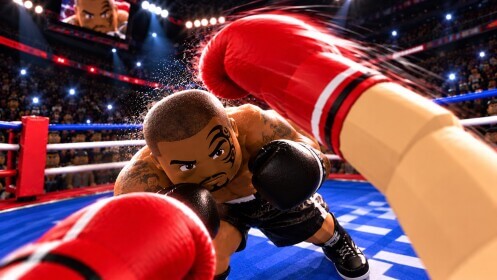
First Person Boxing is a first person boxing game on Roblox by the creator Can You Box?, and it does exactly what the name promises: you fight from a true first-person perspective, your own boxing gloves at the bottom of the screen. The official description puts it plainly — step into the ring, where every punch, slip, counter, and knockout is in your control. There is no top-down camera and no boxer puppet to steer; you look at your boxing opponent the way you would if you were actually standing on the canvas.
That one design decision changes the whole feel. On a boxing page you normally read about a fighter’s reach and stance from the outside. Here, an incoming jab flies at the camera, a successful slip makes the opponent’s punch whiff past your ear, and a clean counter is the last thing you see before the knockdown replay starts. If you have ever searched for a first-person boxing game and found only boxing-manager spreadsheets or side-view arcade fighters, this is the different thing: the fight from inside the head of the boxer.
One expectation to set before the details: the game is a Roblox experience. It runs on the Roblox platform on PC, mobile and console — it is not a browser game, and GameClick does not host or embed it. This page collects the verified gameplay facts, the controls picture, the developer, and the official link to play. If you want a boxing fix right now in a browser tab, the free games at the end of this page are the closest options on GameClick.
Gameplay
The core loop is classic boxing, translated into first person. The official objective is to outsmart the opponent and finish the fight: land devastating counters for huge knockouts on the way to becoming the champion.
Three verbs carry the fight, and all three come straight from the official description:
- Slip punches. Slipping is boxing’s small, precise head movement that lets an incoming punch slide past instead of meeting it. In the ring, slipping is how you stay in the pocket without eating damage — the description pairs it directly with outsmarting your opponent.
- Guard up. You can hold different guards to protect your head and body. That is the official wording, and it matters: the game treats guarding as a real, active choice between protection levels, not a single block button you hold forever. What you leave uncovered is what a sharp opponent will target.
- Counter. A counter — boxing’s most rewarding punch — is one you launch into the moment your opponent commits to an attack. The game rewards this explicitly: counters produce devastating knockouts, which makes them the highest-value action in a fight.
Wrapped around those verbs is a stamina system, the rule that separates boxing from brawling. The official description says to manage your stamina, because getting tired slows you down. Throw punches without thinking and your fighter will slow exactly when you need speed most — to slip a punch or to beat the opponent to the counter.
You are not locked into one way to fight: the description lists fighting other players or practicing against AI, so you can learn against computer opponents before you step in against a person. Between fights, knockdowns get the cinematic treatment: the game features cinematic knockdowns and replays, so a fight-ending counter does not just end the round — it shows you the hit again.
That is the whole verified picture: a first-person boxing match built on slip, guard and counter, taxed by stamina, playable against AI or other players, with replays selling the knockout. Exact punch damage values, round structures and progression systems are not documented on the official page, so this page does not invent them.
Controls
First Person Boxing controls are best understood in two layers: the actions the game gives you, and the device you play it on.
The action layer is the set of mechanics above — slipping punches, switching guards to protect your head and body, throwing punches and counters, and pacing your stamina — the verbs that make this a boxing game and not a button-masher, each one an input you actively make in the moment.
The device layer comes from Roblox itself. The official game page lists PC, Mobile and Console as the supported platforms. Roblox’s own support documentation explains how controls work across the platform: each experience can have slightly different rules, controls and mechanics, but the general controls are the same everywhere — keyboard and mouse on PC, the touch interface on mobile, and a controller on console. Roblox also surfaces a help and settings menu inside every experience, so the control reference is always one menu away.
One honest limit: the developer does not publish a punch-by-punch key list on the game’s official page, so this page will not invent one. The exact bindings for slipping, guarding and punching are shown inside the experience itself, where control prompts and the in-experience help and settings menu spell them out on your device — the most reliable source there is.
Tips and strategy
Every tip below is derived from the verified rules above — no secret tech, just the boxing consequences of slip, guard, counter and stamina:
- Spend stamina like it is a resource, because it is. Getting tired slows you down, and slowing down is how you eat the counter you were planning to throw. Keep bursts short and let the bar recover before you commit again.
- Make the opponent pay for committing. Counters are where the huge knockouts live. When you see the opponent start a punch, that is your opening — slip it and answer in the same beat.
- Guard is a choice, not a posture. Different guards protect different targets on your head and body. Pick the guard that covers where the opponent has been aiming, and switch so you are not readable.
- Use the AI. The game lets you practice against AI before you fight other players. Verify your timing against the computer first; human opponents punish predictable slipping much harder.
- Master your movement. The official description closes on it: master your movement, find the opening, become the champion. Standing still in front of a counter-puncher is a losing plan.
Who makes First Person Boxing?
The game is made by Can You Box?, a Roblox creator whose name alone tells you the studio’s whole thesis. The experience is live and actively maintained on Roblox — the official page is the source of truth for the current version. The creator publishes the game on Roblox’s own platform, so there is no separate launcher, no installer outside the Roblox app, and no second official download.
Where to play
First Person Boxing is played on the official Roblox game page. That link is the developer’s official listing; open it, press play, and Roblox launches the experience on your device. Roblox itself is free to download and play, supported on PC, mobile and console, and you need a free Roblox account to play any experience.
Two honest notes for people searching for alternatives:
- There is no official browser version. The game runs on the Roblox platform only, and GameClick does not host or embed it. Websites offering an “unblocked” browser clone are not the official game by Can You Box? — play the real one from the link above.
- Free browser boxing alternatives exist on GameClick. They are different games, not ports of this one, but they scratch the same one-more-round itch without leaving the browser. See the list below.
FAQ
What is First Person Boxing? It is a first-person boxing game on Roblox by the creator Can You Box? You fight from inside the boxer’s view in a proper boxing match, using slips, guards and counters against other players or AI opponents, with a stamina system that slows you down when you get tired.
Is it free to play? The game is on Roblox, which is free to download and play, and joining an experience like this one is free with a Roblox account. The official page is the source of truth for optional in-game purchases.
Can I play it on mobile or console? Yes. The official page lists PC, Mobile and Console as supported platforms. On mobile you play through the Roblox app’s touch controls; on console, through the Roblox app with a controller.
What are the controls like? The documented actions are slipping punches, holding different guards for your head and body, punching, countering, and managing stamina. The exact keybindings per device are shown inside the game — the developer does not publish a key list on the store page, and Roblox’s in-experience menu carries the control reference for your device.
Is it multiplayer? It can be. The official description lists fighting other players or practicing against AI, so you can choose between human opponents and computer practice.
Can I play it in a browser? No. It is a Roblox platform experience with no browser version, and GameClick does not host it. Browser sites claiming to run the boxing game are unofficial clones. The real game is at the official Roblox page linked above.
Who made the game? Can You Box?, a Roblox creator. The game is published and maintained on the official Roblox listing.
Similar fighting and sports games on GameClick
Waiting between fights? These free boxing-adjacent games on GameClick run instantly, no download and no account:
- Wrestle Bros — intense wrestling action you can play solo, with friends, or online.
- Soccer Bros — fast-paced soccer fun: play solo or challenge friends online.
- Smash Karts — explosive kart action in chaotic multiplayer arenas: race, blast, and customize your ride.
- Tap Tap Shots — a fast, fun mini-basketball game that is easy to learn and hard to master.
- Baseball Star — bat, bowl, and field your way to victory in this sports simulation game.
They will not teach you to slip a jab, but the reflexes transfer better than you would think.